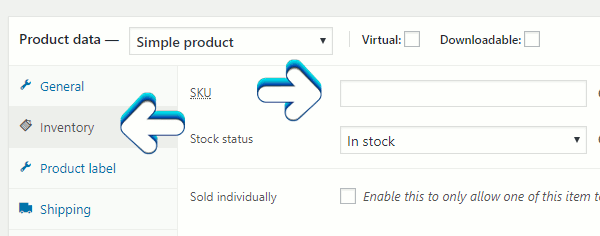
Categories 2 Cloudflare 7 cPanel 5 Emails 10 General 8 Woocommerce 27 WordPress Categories Cloudflare (2) cPanel (7) Emails (5) General (10) Woocommerce (8) WordPress (27) Add an ID to a Woocommerce Product PDF Download On the product's editing page, scroll down to the Product data section. Select the Inventory section and enter in the ID of your choice in the Stock Keeping Unit (SKU) field. Author: Jesse Lange 29 Users Found This Useful Was this answer helpful? Yes No Related Articles Add categories in Woocommerce PDF Download There are two ways to add categories in Woocommerce. The first way is to go to the... Where to find your customers and their purchases in Woocommerce First log into your WordPress dashboard for your website. To see and edit your customers you have... How to use Woocommerce Advanced Shipping plugin PDF Download This article covers some of the basics of using the Woocommerce Advanced Shipping... Video on installing Woocommerce This video is courtesy of www.woocommerce.com Video on Woocommerce general settings Here's a great short video from https://woocommerce.com/videos/ on Woocommerce general settings. Support My Support Tickets Announcements Knowledgebase Downloads Network Status Open Ticket